
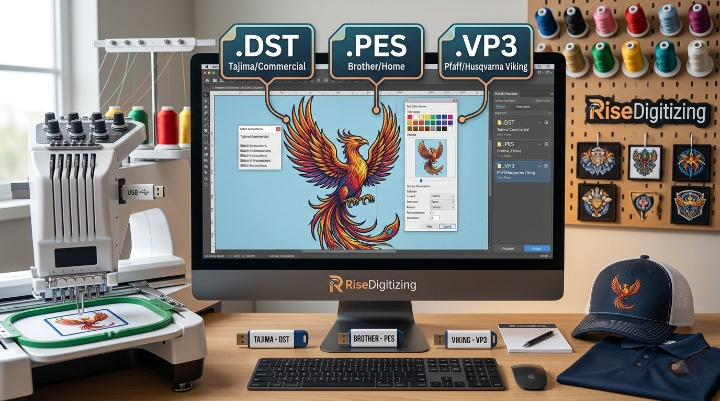

Stepping into the world of machine embroidery can feel a bit like decoding a secret language. Between tension settings, stabilizer choices, and digitizing software, you are suddenly hit with a wave of three-letter extensions: .DST, .PES, .VP3, .EXP, .JEF—the list goes on.
Choosing the incorrect stitch file can lead to machine errors, warped designs, or an absolute refusal from your equipment to read your USB drive.
To help you navigate this, Risedigitizing has broken down three of the most widely used industrial and domestic embroidery file formats: DST, PES, and VP3. By the end of this guide, you will know exactly which file format fits your project, how they differ, and how to pick the right one every time.
The Core Concept: What is an Embroidery File?
Unlike a standard image file (like a PNG or a JPG) which tells a screen which colored pixels to display, an embroidery file acts as a complex blueprint for a machine. It contains precise mathematical coordinates telling the needle where to drop, when to trim the thread, when to jump to another section, and when to stop for a color change.
Because different embroidery machine brands use proprietary hardware systems, they require different file types to understand these commands. If you try to feed a Husqvarna machine a Brother file without converting it, your machine simply won’t cooperate.
1. The DST File Format: The Industrial Titan
What is a DST File?
Developed originally by Tajima—one of the absolute giants in industrial embroidery manufacturing—the .DST (Data Stitch Tajima) format is universally recognized as the gold standard for commercial embroidery.
Key Characteristics:
- Brand Compatibility: Tajima, Barudan, Happy, SWF, Melco, and nearly every industrial multi-needle machine.
- Universal Nature: Almost every modern commercial and domestic machine can read a DST file. It is the closest thing the embroidery industry has to a universal PDF.
- The Big Catch: DST files do not store specific color data.
Important Note: A DST file only stores “color change” commands, not the actual color shades. When you open a DST file on an embroidery machine or in software, the machine will assign random default colors to the segments. The operator must manually map the real thread colors to the machine’s needles using a production sheet.
If you plan to run a high-volume apparel shop, outsourcing your designs to a professional embroidery digitizing studio to secure a perfect, production-ready DST file is standard practice.
2. The PES File Format: The Hobbyist Favorite
What is a PES File?
The .PES file format is a proprietary format owned by Brother and Babylock. Because Brother manufactures some of the most widely used single-needle and multi-needle embroidery machines on the planet, PES is arguably the most common format encountered by home crafters, Etsy sellers, and boutique shops.
Key Characteristics:
- Brand Compatibility: Brother and Babylock.
- Rich Metadata: Unlike DST, a PES file stores exact color codes (often tied to Brother’s proprietary thread charts), hoop size specifications, design dimensions, and density parameters.
- Ease of Use: When you load a PES design into your Brother machine, it displays exactly how the final product will look, showing the correct colors sequentially.
If you are just starting out with a domestic machine, working with a native stitch file for embroidery like PES minimizes setup errors and lets you focus entirely on your fabric and placement.
3. The VP3 File Format: The European Precision Standard
What is a VP3 File?
The .VP3 format is a highly sophisticated, proprietary file format used predominantly by Husqvarna Viking and Pfaff machines (both brands operate under the parent umbrella of SVP Worldwide).
Key Characteristics:
- Brand Compatibility: Husqvarna Viking and Pfaff.
- Advanced Data Management: VP3 files are incredibly efficient. They hold comprehensive project information, including highly precise layout arrangements, exact color palettes, specific hoop definitions, and detailed stitch parameters.
- Multi-Hoop Coordination: VP3 excels at handling large, complex split-designs that require multiple hoopings on high-end European machines.
Direct Comparison: DST vs. PES vs. VP3
To simplify your decision-making process, here is a breakdown comparing how these three prominent formats stack up against one another:
| Feature | DST (.dst) | PES (.pes) | VP3 (.vp3) |
| Primary Target | Commercial / Industrial | Home Crafters / Small Businesses | Boutique Custom / Luxury Crafters |
| Primary Brands | Tajima, SWF, Barudan (Universal) | Brother, Babylock | Husqvarna Viking, Pfaff |
| Stores Color Info? | No (Uses default/random previews) | Yes (Brother thread palette) | Yes (Pfaff/Viking thread palette) |
| Scalability | Poor (Stitch count remains rigid) | Moderate (Within native software) | Moderate (Within native software) |
| Trims & Jumps | Relies entirely on machine logic | Explicitly programmed in file | Explicitly programmed in file |
Can You Convert Between These Formats?
Yes, you can! If you fall in love with a design that is packaged as a .PES file, but you own a commercial Tajima machine that requires .DST, you can convert it.
There are several ways to tackle conversion:
- Free Conversion Utility Software: Programs like Premier+ ECue or embroidery machine-specific organizers allow basic file format swapping.
- Dedicated Digitizing Software: Full-tier professional suites like Wilcom, Hatch, or Embrilliance let you open one format and “Save As” another.
- Professional Cross-Format Conversion: If you are working with complex, high-stitch counts, manually converting files using free software can sometimes cause corrupted commands or dropped jump stitches. To avoid machine nests, operators frequently utilize custom dst to pes professional conversion services to safely retain stitch integrity.
How to Choose the Format You Nee
When downloading, purchasing, or ordering custom digitizing files, ask yourself these three basic questions to find your format:
1. What Machine Am I Using?
- If it’s an industrial multi-needle machine $\rightarrow$ DST
- If it’s a Brother or Babylock machine $\rightarrow$ PES
- If it’s a Pfaff or Husqvarna Viking machine $\rightarrow$ VP3
2. Am I Designing This Myself or Outsourcing?
Raw image files like JPEGs or SVGs cannot be parsed by an embroidery machine. To transform a custom illustration into an operational file, it must pass through a specialized digitizer. If you are handling commercial logos or client work, relying on high-tier custom embroidery digitizing guarantees that whether you request a DST, PES, or VP3, the file is perfectly structured for production.
3. Does the Stitch File Contain Complex Trims?
For highly intricate projects—such as layered jackets or heavy custom crests—industrial operators prefer DST because industrial machines ignore embedded software trims and execute cuts based on the hardware’s own highly optimized mechanical logic. For home users, PES and VP3 are preferred because they dictate automatic cuts directly to single-needle units.
Final Thoughts
Understanding your embroidery file extensions is the key to minimizing machine errors, eliminating broken needles, and achieving smooth, beautiful production runs.
- DST is your universal, commercial workhorse.
- PES is your user-friendly, color-accurate companion for Brother machines.
- VP3 provides elite structural layout precision for Viking and Pfaff enthusiasts.
At Risedigitizing, we specialize in transforming your logos, vector art, and creative concepts into flawlessly coded embroidery files—tailored exactly to the format your specific machine demands. Don’t let file confusion stall your embroidery production line!


