
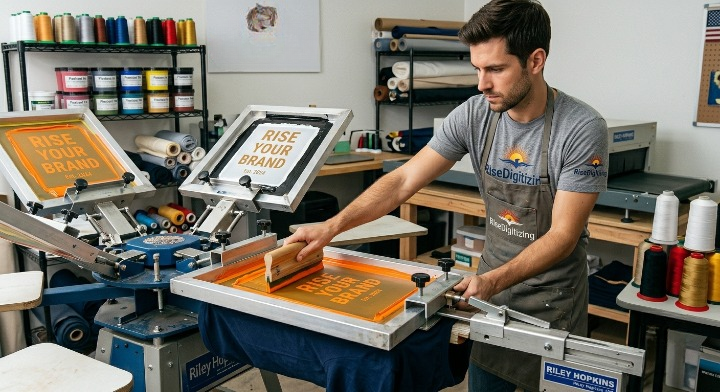

For small apparel brands, local print shops, and entrepreneurial side-hustlers, selecting the right physical equipment is the single most critical factor in determining your daily production capacity. If you choose a press that is too simple, you will outgrow it within months. Choose one that is too complex, and you carry massive overhead costs without the sales volume to support it.
However, many shop owners forget that even the most expensive machinery cannot deliver pristine results without immaculate, high-resolution source files. Before a squeegee ever touches ink, your design files must be prepped flawlessly.
Let’s dive into the top-rated screen printing machines for small businesses and explore how to pair your hardware with expert file design to maximize your profits.
Understanding Your Press Options: Manual vs. Semi-Automatic vs. Automatic
Screen printing equipment generally falls into three core operational classes. Your daily volume requirements should dictate which category fits your physical workspace:
| Machine Type | Best For | Production Volume | Average Cost | Space Needed |
| Manual Press | Startups, Home Garages, Local DIY Teams | Under 150 prints/day | $200 – $1,500 | Minimal (Fits in a single-car garage) |
| Semi-Automatic | Growing Shops, Expanding Brands | 150 – 500 prints/day | $3,000 – $10,000 | Moderate workshop area |
| Fully Automatic | Commercial Production, Scale Subcontracting | 500+ prints/day | $15,000+ | Large dedicated industrial floor |
Why Machine Registration Matters More Than Speed
When evaluating a machine, look beyond how fast the carousel spins. High-quality production relies on micro-registration knobs. Without precise micro-registration, multi-color designs will shift during production, creating misaligned gaps between ink layers and forcing you to throw out ruined garments.
Top-Rated Screen Printing Machines for Small Businesses
1. Riley Hopkins 150 4-Color, 1-Station (Best Starter Press)
For home-based startups or garage operations looking for commercial-grade durability on a minimal budget, the Riley Hopkins 150 is widely considered an industry benchmark.
- The Highlights: Built with a rugged steel frame that minimizes arm wobble, ensuring highly reliable registration for multi-color prints.
- Why It Wins: Unlike cheap unbranded online entry-level models, it maintains its alignment over thousands of pulls, offering an exceptionally high return on investment (ROI) for a tabletop press.
2. VEVOR 4-Color, 2-Station 360° Rotatable Carousel (Best Budget Setup)
If you need multi-station efficiency without a premium price tag, this configuration is a popular alternative.
- The Highlights: Features a dual-layer positioning platen that stays rigid while you index garments.
- Why It Wins: The extra station allows you to flash cure one shirt while printing on another, doubling your output speed on multi-color jobs without requiring automated mechanics.
3. Workhorse WM-6 6-Color, 6-Station (Best Small Commercial Option)
When your daily order volume starts crossing the 150-piece mark, transitioning to a full-size floor carousel becomes essential. The Workhorse WM-6 balances a compact physical footprint with full high-volume capability.
- The Highlights: This machine offers total tool-free adjustments and easy platen swapping for printing hoodies, youth shirts, and sleeves.
- Why It Wins: Six color stations give you the freedom to handle complex, highly detailed spot-color illustrations or simulated process prints easily.
The Secret to Perfect Screen Prints: Clean Vector Files
An industrial-grade press cannot fix a blurry, jagged, pixelated source file. If your artwork file is low-resolution, your screens will burn with jagged stencils, resulting in rough, unprofessional prints on your garments.
To achieve razor-sharp lines and smooth halftones, your digital artwork must be converted into pristine, geometric shapes.
+-------------------------------------------------------------------------+
|                  THE PRODUCTION SECRETS OF HIGH-END APPAREL             |
|                                                                         |
|  * High-Res Vectors -> Clean film positives -> Crisp screen stencils.    |
|  * Clean Stencils -> Even ink deposit -> Maximum wash durability.       |
|  * Mixed-Media Prep -> Seamless workflow when adding embroidered tags.  |
+-------------------------------------------------------------------------+

At RiseDigitizing, we specialize in transforming low-res images into scalable files built specifically for production. If you have a client logo that is stuck inside a low-res graphic format, our professional vector art conversion service ensures your film separations come out crisp every single time.
Additionally, if you are looking to scale your shop’s offerings, understanding what is vector artwork benefits uses can help you transition from simple text layouts to complex graphic branding.
Expanding Beyond Ink: Diversifying Your Shop’s Capabilities
Many small businesses find that screen printing opens the door to high-margin requests for embroidery and custom merchandise. If you want to keep your clients from outsourcing half of their orders to your competitors, look into offering mixed-media options.
- Custom Patches: Offering patches is an easy way to upselle merchandise. You can learn the operational steps via our guide on how to make embroidery patches to expand your product catalog.
- Embroidered Accents: Adding embroidered left-chest logos alongside large screen-printed back graphics adds immediate retail value. Check out our comprehensive walkthrough on how to digitize a logo for embroidery to see how simple it is to expand your workflow.
If you aren’t sure how screen printing costs stack up against other custom methods, check out our comparative guide detailing embroidery vs screen printing which is best to build a smarter, more profitable pricing structure for your clients.
Frequently Asked Questions (FAQ)
Q1: Is a 1-color or 4-color press better for a brand new small business?
A 4-color press is almost always the better choice for a new business. While a 1-color press is slightly cheaper, it limits you to basic single-color designs. A 4-color press gives you the flexibility to print full-color graphics, athletic numbers, and multi-colored logos, preventing you from having to turn down profitable jobs.
Q2: What is the main difference between vector files and embroidery files?
Vector files use mathematical paths to create clean, scalable shapes meant for printing ink on film or vinyl. Embroidery files contain specific stitch instructions, paths, and densities meant for computerized needles. If you are confused about how these two file formats interact on your production floor, read our breakdown on what is the difference between vector conversion and embroidery digitizing.
Q3: Do I need a conveyor dryer, or can I use a flash cure unit to dry shirts?
A flash cure unit can cure ink, but it is slow and can lead to uneven drying if you aren’t careful. For a commercial business, a conveyor dryer is highly recommended because it provides consistent heat throughout the entire garment, ensuring your prints won’t crack or wash out later.
Q4: How do I know if my small business is ready to upgrade to an automatic press?
If your manual press is consistently booked full and you are turning down large bulk orders because you physically can’t keep up with the manual printing labor, it is time to upgrade. To help budget for that transition, explore our breakdown on screen printing prices guide compare costs.
Let RiseDigitizing Fuel Your Production Flow
Choosing the right screen printing machine gives your business its muscle, but high-quality artwork gives your brand its soul. Let RiseDigitizing handle your complex file preparation while you focus on spinning your carousel and locking in local clients.
Need your artwork prepared for production? Head to ourGet Free Quotepage to upload your designs, or reach out through ourContact Pageto see how our vector conversion services can speed up your screen setup times!


