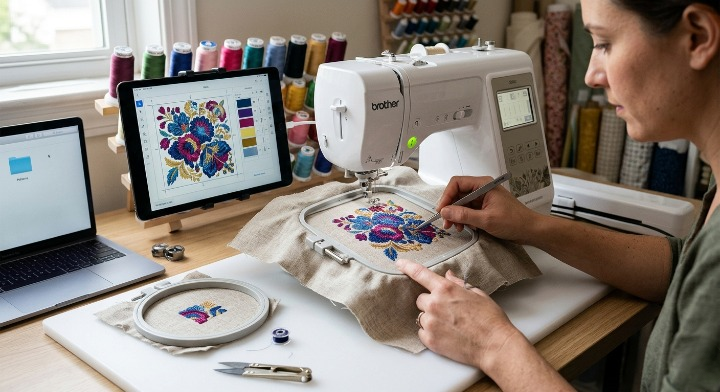

Digitizing complex embroidery patterns for a 4×4 hoop can be one of the most challenging aspects of machine embroidery. While larger hoops offer more space and flexibility, a 4×4 hoop requires careful planning, precise stitch placement, and advanced digitizing techniques to achieve professional results.
Many embroidery enthusiasts and business owners struggle when trying to fit detailed logos, intricate artwork, or complex designs into a limited embroidery area. Without proper digitizing, designs can become distorted, lose important details, or stitch poorly on fabric.
In this guide, Risedigitizing explains how to digitize complex patterns for 4×4 hoop machine embroidery while maintaining design quality, stitch efficiency, and production accuracy.
Before digitizing a design, it’s important to understand the constraints of a 4×4 embroidery hoop.
A standard 4×4 hoop provides an embroidery area of approximately:
This limited space means digitizers must carefully manage:
The smaller the hoop, the more critical proper digitizing becomes.
Successful embroidery digitizing always begins with quality artwork.
The best formats include:
Avoid using:
Clear artwork allows digitizers to identify which elements can realistically be reproduced within a 4×4 embroidery area.
One of the biggest mistakes beginners make is attempting to embroider every detail exactly as it appears in the artwork.
Embroidery is not printing.
Small details often disappear during stitching.
When preparing a design for a 4×4 hoop:
Consider eliminating:
The goal is to preserve the overall appearance while making the design embroidery-friendly.
Complex designs often contain multiple visual components.
Ask yourself:
“What absolutely must remain visible?”
Focus on:
Secondary details can often be simplified or modified to improve stitch quality.
Different stitch types serve different purposes.
Choosing the right stitch type is essential when working with limited hoop space.
Best for:
Advantages:
Best for:
Advantages:
Best for:
Advantages:
High-density stitching can cause problems in small embroidery areas.
Common issues include:
For complex 4×4 hoop patterns:
Balanced density improves both appearance and machine performance.
Small lettering is one of the most difficult elements in embroidery digitizing.
General guidelines include:
Works best when letters are:
May be used for:
If text becomes unreadable after resizing, consider increasing size or simplifying the font.
Underlay plays a crucial role in embroidery quality.
Proper underlay:
For complex patterns, use underlay strategically rather than excessively.
Too much underlay can create unnecessary bulk in a small hoop design.
Every color change adds production time and increases the risk of registration issues.
When digitizing complex designs:
Efficient sequencing creates cleaner embroidery and faster production.
Stitch direction affects:
Changing stitch angles strategically helps separate adjacent objects and improves visual depth.
This technique is particularly useful when fitting detailed artwork into a compact 4×4 area.
Push and pull distortion occurs naturally during embroidery.
Without compensation:
Professional digitizers apply compensation settings to maintain accurate shapes after stitching.
This becomes especially important in smaller embroidery designs where slight distortions are more noticeable.
Some designs simply cannot fit into a single 4×4 hoop area.
In such cases, consider:
Advanced digitizing software allows complex artwork to be divided into manageable sections while maintaining alignment.
Even the best digitized file should be tested before production.
A sample sew-out helps identify:
Professional digitizers often perform multiple test runs before approving a design.
Testing saves both time and materials in the long run.
Digitizing and stabilization work together.
The wrong stabilizer can ruin an otherwise perfect design.
Common options include:
Ideal for:
Suitable for:
Helpful for:
Always match the stabilizer to both the fabric and design complexity.
Avoid these common errors:
Correcting these issues can dramatically improve embroidery quality.
Popular embroidery digitizing software includes:
These programs offer advanced tools for optimizing designs specifically for smaller hoop sizes.
Complex embroidery designs often require technical expertise beyond automatic digitizing tools.
Professional digitizers understand:
A professionally digitized design typically produces cleaner results, fewer thread breaks, and better overall embroidery quality.
At Risedigitizing, we specialize in converting complex artwork into production-ready embroidery files optimized for all hoop sizes, including 4×4 hoops.
Our digitizing services include:
Every design is manually digitized and tested to ensure maximum embroidery quality and machine efficiency.
Digitizing complex patterns for 4×4 hoop machine embroidery requires careful planning, technical expertise, and a deep understanding of embroidery mechanics. By simplifying artwork, selecting appropriate stitch types, controlling density, optimizing underlay, and performing test sew-outs, you can achieve professional-quality results even within a limited embroidery area.
Whether you’re creating custom logos, intricate artwork, or detailed branding designs, proper digitizing is the key to successful embroidery production.
If you need expert embroidery digitizing services for complex 4×4 hoop designs, Risedigitizing can help transform your artwork into clean, efficient, and production-ready embroidery files.



