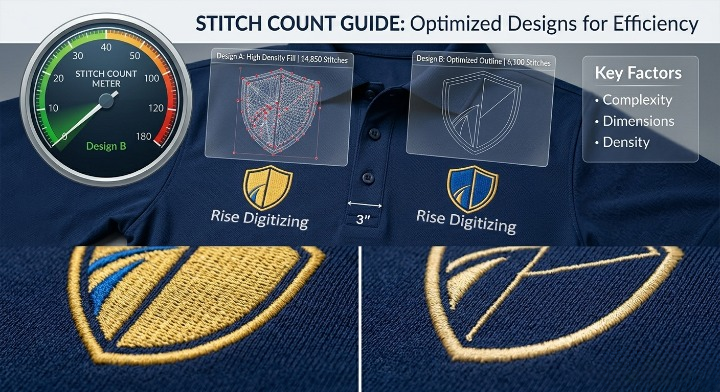

When ordering custom embroidered apparel for your brand, one of the first technical terms you will encounter is stitch count.
If you are working with an embroidery shop or an outsourcing partner like Rise Digitizing, you’ll quickly notice that pricing, production time, and final quality all revolve around this single number.
But how many stitches does a logo actually need? Why does a 3-inch logo sometimes require 5,000 stitches, while another one the exact same size requires 15,000?
In this comprehensive guide, we will break down the variables that dictate embroidery stitch counts, provide real-world estimation benchmarks, and help you optimize your designs for the best results.
Simply put, a stitch count is the total number of individual needle penetrations required to reproduce a digital design on fabric.
Understanding your logo’s stitch count is crucial for three major reasons:
While every logo is unique, industry averages can give you a solid baseline for budgeting. Here is a handy reference table for standard branding placements:
| Placement Type | Average Dimensions | Typical Stitch Count Range |
| Left Chest Logo (Corporate/Polo) | 3″ to 4″ wide | 4,000 – 10,000 stitches |
| Baseball Cap / Hat (Front) | 2″ to 2.25″ high | 5,000 – 12,000 stitches |
| Cap (Side or Back) | 1.5″ to 2.5″ wide | 1,500 – 4,000 stitches |
| Jacket Back (Large Center) | 8″ to 11″ wide | 25,000 – 75,000+ stitches |
| Sleeve Brand Logo | 2″ to 3″ wide | 2,000 – 6,000 stitches |
You can’t determine stitch count based on physical size alone. Two logos can measure exactly $3 \times 3$ inches, but one might have triple the stitch count of the other. Here is why:
A minimalist text-only logo requires significantly fewer needle drops than an intricate crest featuring gradient fills, shield borders, and fine background patterns. More elements naturally equal more thread.
The type of stitch chosen during the digitizing process drastically impacts the final count:
Every single letter requires a foundation (underlay) and a top layer of satin stitches. If your logo includes a lengthy tagline or small website URL at the bottom, your stitch count will climb rapidly.
Stiff canvas, thick denim, and heavy hoodies can handle dense, multi-layered embroidery. Lightweight performance polyesters or delicate silk blends require a lighter touch. A professional digitizer will purposely lower the stitch density for lighter fabrics to prevent the garment from puckering.
If you don’t have professional digitizing software, you can use the 1-Square-Inch Rule to get a rough, ballpark estimate for a standard left-chest or hat logo:
The Quick Formula:
As a baseline rule of thumb, 1 square inch of solid embroidery coverage equals roughly 1,200 to 2,000 stitches.
If you find that your design’s stitch count is too high for your budget or too heavy for your chosen fabric, you don’t necessarily have to change your branding. You can optimize it:
While formulas and grids offer helpful estimates, the only way to know your exact stitch count is to have your artwork processed by a professional digitizing engineer.
At Rise Digitizing, we don’t guess. We analyze your artwork, map out the precise stitch paths, and optimize the file specifically for your target garment. Whether you need an ultra-efficient file optimized for a high-speed production run or a premium 3D puff execution for headwear, we deliver clean, industry-standard machine files (.DST, .PES, .EXP) that execute flawlessly.
Stop guessing your production costs. Send us your logo today, and our team will provide a highly accurate blueprint tailored to your brand’s embroidery needs.



