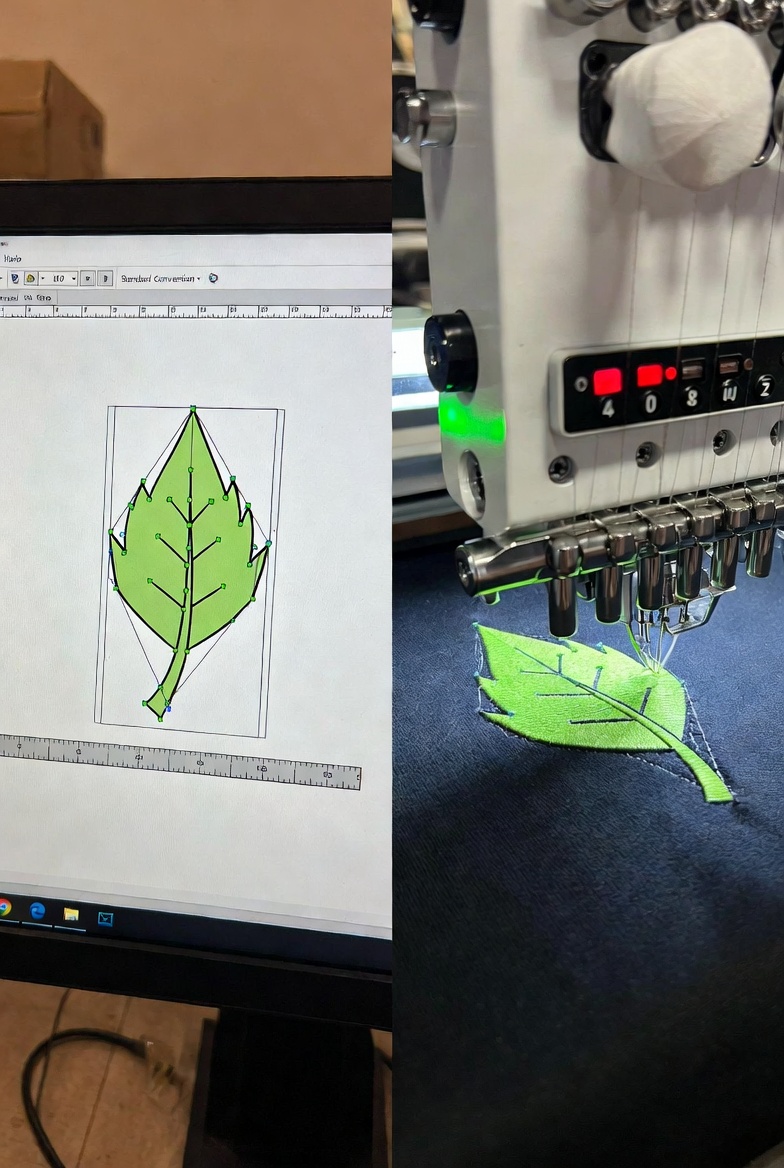

In today’s custom apparel and branding industry, the ability to convert vector to embroidery file format accurately is essential. Whether you’re working with logos, monograms, or detailed artwork, embroidery machines cannot read standard vector files like AI, EPS, or SVG directly. They require stitch-based formats such as DST, PES, JEF, or EXP.
Many businesses search for quick solutions, but quality embroidery digitizing is more than just automatic conversion. In this blog, we’ll explain how vector artwork transforms into stitch files, compare modern conversion approaches, and highlight what makes professional results stand out.
A vector file is made up of scalable paths and mathematical curves. These designs are ideal for printing because they maintain sharpness at any size. However, embroidery machines operate differently. They follow stitch commands — not paths.
When you convert vector to embroidery file, the artwork must be translated into:
This process is known as embroidery digitizing.
Unlike simple file conversion tools, digitizing requires manual adjustments to ensure the design stitches cleanly on fabric without puckering, thread breaks, or distortion.
Vector files are actually the best starting point for embroidery digitizing because:
Compared to raster images (like JPG or PNG), vectors reduce errors during stitch mapping. That’s why professionals prefer AI, EPS, or SVG formats when converting vector to embroidery file.
Here’s a simplified step-by-step breakdown:
The artwork is examined for small details, thin lines, gradients, or overlapping elements that may not stitch properly.
Each section of the design is assigned a stitch type:
Proper stitch angles reduce fabric pull and improve appearance. Density is adjusted based on fabric type.
Underlay stitches stabilize the fabric and improve top stitch quality.
The final design is saved in a machine-readable format like DST or PES.
This process ensures a clean and production-ready embroidery file.
Some blogs discuss how vector conversion impacts design quality, focusing mainly on visual refinement. However, embroidery digitizing goes deeper than visual alignment.
Here’s how professional digitizing differs:
| Basic Auto Conversion | Professional Digitizing |
| Automated mapping | Manual stitch planning |
| Limited stitch control | Custom stitch direction |
| No fabric adjustment | Fabric-based optimization |
| Risk of thread breaks | Balanced density & underlay |
While automated tools may offer fast results, they often ignore fabric behavior and machine settings. Professional services carefully plan every stitch for durability and clean finishing.
Many beginners rely on one-click conversion software, which can lead to:
High-quality digitizing prevents these issues by adjusting stitch length, pull compensation, and underlay techniques.
You’ll need embroidery file conversion if:
Professional conversion ensures your brand identity remains sharp and consistent on fabric.
Choosing expert digitizing services offers:
When you convert vector to embroidery file correctly, production becomes smoother and more cost-efficient.
1. Can I directly use a vector file in an embroidery machine?
No. Embroidery machines require stitch-based files like DST or PES, not AI or SVG formats.
2. Is auto-digitizing software reliable?
It works for simple designs but may not produce high-quality results for detailed logos.
3. What is the best format for embroidery machines?
DST is widely used, but the required format depends on your embroidery machine brand.
4. Does fabric type affect digitizing?
Yes. Different fabrics require different stitch density and underlay settings.
5. How long does it take to convert vector to embroidery file?
Simple logos may take a few hours, while complex designs require more time for precision planning.
The process to convert vector to embroidery file is both technical and creative. While vector artwork provides a strong foundation, successful embroidery depends on expert stitch mapping, fabric understanding, and machine compatibility.
Unlike basic conversion discussions that focus only on design transformation, professional embroidery digitizing emphasizes stitch control, durability, and real-world production quality. If you want sharp, long-lasting embroidered results, manual digitizing remains the most reliable approach.
Investing in proper conversion ensures your logo doesn’t just look good on screen — it looks exceptional on fabric.



